Every filing your practice does, in one place
Confirmation statements, accounts, VAT, payroll and tax returns for all your clients, with every deadline in view. Your practice submits under its own credentials.
- Built on Companies House and HMRC's official interfaces
- UK-hosted data
- Encryption for credentials and authentication codes
- Your practice keeps its own presenter account
Everything your practice files
See everything Fyling doesCompanies House
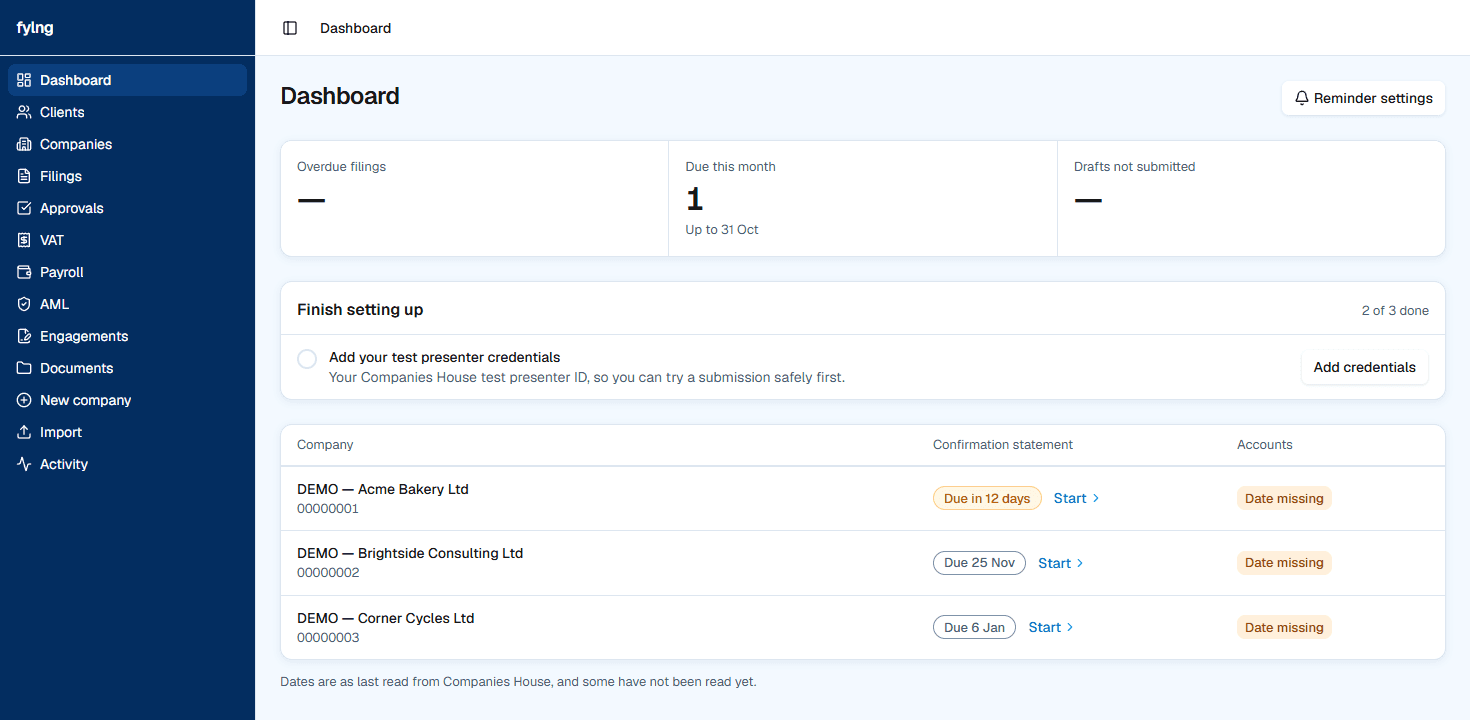
Every client's deadline in one list
- Confirmation statements and accounts dates for every client company.
- Most urgent first, overdue in red.
- Company details filled in from Companies House when you add a client.
Review before submitting
- Registered office
- Officers
- People with significant control
- Shareholders
- Share capital
Review a confirmation statement before it goes
- Starts from the company's own Companies House record.
- Check officers, shareholders and capital on one review page.
- Your practice submits under its own presenter credentials.
The nine boxes
- 1VAT due on sales
- 2VAT due on acquisitions
- 3Total VAT due
- 4VAT reclaimed on purchases
- 5Net VAT to pay or reclaim
- 6Total sales
- 7Total purchases
- 8Supplies to EU countries
- 9Acquisitions from EU countries
VAT returns, nine boxes at a time
- See each client's VAT obligations and what is due.
- Prepare the nine-box return and check it before it is sent.
- Your practice submits to HMRC under its own login.
Moving from your current software?
Bring your client list in from a CSV file, and load each company's trial balance from a CSV file or type the numbers in.
How it works
- 1
Add your client companies
Enter each company number, or paste a list. We fill in the company details from Companies House.
- 2
Review what is due
See every client's confirmation statement and accounts dates, most urgent first.
- 3
Prepare and submit
Fyling prepares the confirmation statement. Your practice submits it to Companies House under your own presenter credentials.
Your clients’ data, handled with care
Your practice submits under its own credentials. We are the software, and we keep what you enter safe.
Practices are kept apart
Every practice's data is walled off from every other practice's, in the database itself, not only in the app.
Credentials are encrypted
Presenter credentials and company authentication codes are encrypted before they are stored, and never shown again after you enter them.
Every submission is on record
Each submission, and each change to a filing, is written to an audit trail your practice can read back.
Hosted in the UK
The app runs in London and the database is in London.
Questions practices ask
Who files with Companies House?
Your practice does. It submits under its own presenter account; Fyling is the software that prepares the filing and sends it with your credentials.
Do we need our own presenter account?
Yes. Each practice enters its own Companies House presenter ID and authentication, and we store them encrypted.
What happens if Companies House rejects a filing?
The filing shows as rejected, with the reason Companies House gave, so you can fix it and submit again.
How do clients approve a filing?
If your practice turns approval on, the client gets a link in their own portal to review the filing and approve it before you submit.
Can we import our existing clients?
Yes. Add companies by pasting their Companies House numbers, and Fyling fetches each company's record.
Where is our data stored?
In the UK. The app runs in London and the database is in London.
How much does it cost?
Pricing depends on the size of your practice and the work you file. Book a walkthrough and we will send you a quote.
How does anti-money laundering work?
Fyling gives your MLRO the tools: a risk assessment for each client, due diligence records, sanctions screening and PEP statements. Fyling does not check documents or screen for PEPs against a database. The decisions stay with your practice.
Get started today
Tell us about your practice and we will be in touch by email to set it up.
Prefer a conversation? Talk to us